Voting during a general assembly, annual meeting, or hybrid member meeting can feel complicated fast. Between managing eligible voters, opening and closing voting rounds, sharing results, and keeping the meeting moving, administrators need a process that is both flexible and easy to follow.
That is where AssociationVoting’s General Meeting Voting feature can help.
General Meeting Voting is designed for organizations that need to conduct live or meeting-based votes, whether the meeting is virtual, in person, or hybrid. Instead of handling paper ballots, manual vote counts, or disconnected polling tools, administrators can manage voting rounds directly through AssociationVoting while members cast their votes from their own devices.
In the video demo linked below and highlighted throughout this article, the example election takes place during a general meeting with both virtual attendees and people attending live in person. Voters can access the secure election site from a smartphone, tablet, laptop, or desktop, making it easier for everyone to participate from wherever they are.
What Is General Meeting Voting?
General Meeting Voting allows organizations to run votes during a live meeting environment. This can include annual general meetings, virtual assemblies, board meetings, member meetings, or any event where decisions need to be made in real time.
Rather than setting up one long ballot for every decision, voting can be organized into separate rounds. Each round can be opened when the meeting reaches that agenda item and closed once members have had time to vote.
This gives administrators more control over the meeting flow while still keeping the voter experience simple.
A Simple Experience for Voters
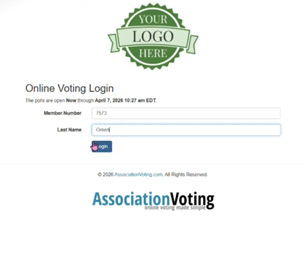
From the voter’s perspective, the process is straightforward. Members can log in, view the active voting item, make their selection, and submit their vote.
Before voting, members log in using their voter credentials. Depending on how the election is set up, they may also be asked to enter a ballot code shared by the meeting presenter. This helps ensure that only eligible voters participate and that each vote remains unique.
Voters can access the election site directly from their browser and log in using the credentials provided before the meeting.
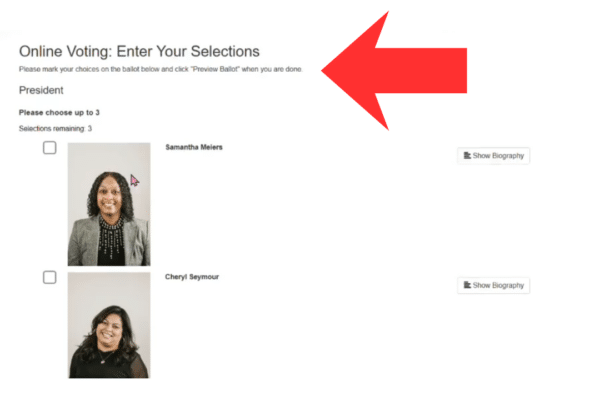 This is especially helpful during live or hybrid meetings because voters do not need to navigate a complicated system. They only see what they need to act on at that moment.
For associations, that means fewer questions, less confusion, and a smoother meeting experience for everyone involved.
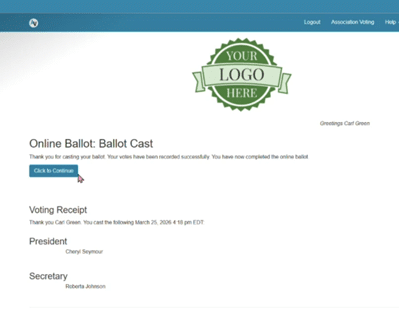
After casting a vote, the voter receives a confirmation page and may also receive a confirmation email with their ballot selections.
Managing Voting Rounds During the Meeting
For administrators or voting managers, General Meeting Voting provides tools to manage each round as the meeting progresses.
Voting managers can open a voting round when it is time for members to vote, monitor participation, close the round, and move on to the next item. This structure is useful for meetings where votes happen throughout the agenda rather than all at once.
Before the meeting, the voting manager can upload the voter list, prepare ballot elements, organize the ballot order, and test the election site. During the meeting, they can start a live election round, share the ballot code, monitor participation and quorum, stop the round, and save or clone results before moving to the next round.
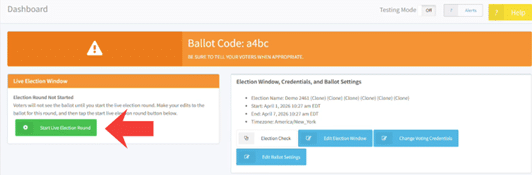
This can help with votes such as:
- Board or officer elections
- Motion approvals
- Bylaw amendments
- Budget approvals
- Policy decisions
- Member polls
- Other meeting-based voting items
Instead of manually tracking participation or waiting on hand counts, voting managers can keep the process organized from one central place and save a results voting record for each round.
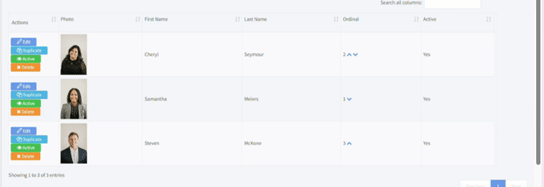
In the demo, the election is managed across three voting rounds. The first round narrows the President candidates from 10 down to the top three. The second round includes the final President vote and a Secretary vote, including the option for a write-in candidate. The final round shows how a new proposal introduced during the meeting can be added and voted on before the election ends.
Built for Virtual, Live, and Hybrid Meetings
Today’s member meetings do not always happen in one room. Some organizations meet fully online, while others have a mix of in-person and remote attendees.
General Meeting Voting supports voting across locations by giving members a digital way to participate, no matter where they are joining from. This makes it easier to include eligible voters, keep the voting process consistent, and reduce the administrative burden that often comes with hybrid participation.
For administrators, it also creates a cleaner process than trying to combine paper ballots, email votes, show-of-hands counts, and virtual polling tools.
Why This Matters for Associations
Live meeting votes often need to happen quickly, accurately, and transparently. When voting is delayed or confusing, it can interrupt the flow of the meeting and create frustration for members and leadership.
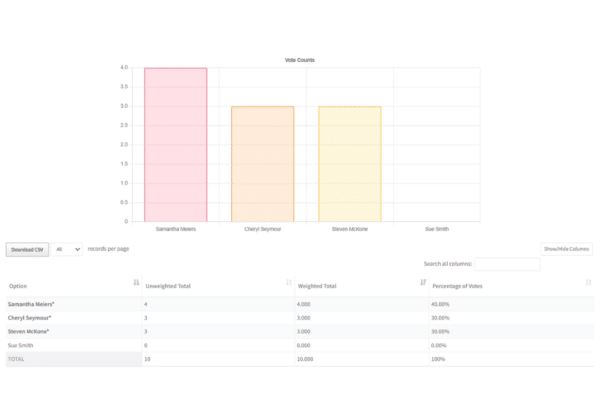
With General Meeting Voting, associations can create a more organized process from start to finish. Administrators can prepare voting item
s ahead of time, manage each round during the meeting, and give members a clear path to participate.
The result is a smoother experience for both the voting manager and the voter.
Voting managers can monitor participation, quorum, and results in real time during each round.
Final Thoughts
General Meeting Voting gives associations a practical way to manage live, virtual, or hybrid meeting votes without relying on manual processes. Whether your organization is running an annual meeting election, voting on motions, or managing multiple decision points during a meeting, AssociationVoting helps keep the process simple and organized.
By making voting easier for members and more manageable for administrators, General Meeting Voting can help your meeting stay focused, efficient, and on track.
Want to see how General Meeting Voting works? Watch the full demo video or contact AssociationVoting to learn how your organization can simplify voting during your next member meeting: https://www.youtube.com/watch?v=PZ8oOE85-KU